
Download Muvee Pixie – Video Editing, Photo Slideshow, Home Video, Music Sync, Social Sharing, Easy Editing, Creative Tool
Overview
Muvee Pixie is a mobile application designed to simplify the creation of engaging home videos from personal photos and videos. Its primary purpose is to transform static images and recorded moments into dynamic, music-synced visual stories without requiring advanced editing skills. The app addresses a common challenge: many users want to preserve memories in a compelling format but lack the time or expertise for complex video editing tools. By automating key aspects of production, Muvee Pixie enables users to quickly generate polished videos suitable for sharing on social media or keeping as digital keepsakes.
Target users include casual content creators, families preserving holiday moments, travelers documenting journeys, and anyone seeking a fun, low-effort way to express creativity through video. The app is particularly useful for those who want to share memories with friends and relatives through platforms like Facebook and YouTube. While the developer did not provide additional background information, Muvee Pixie has been available since 2010, indicating a long-standing presence in the mobile content creation space. Its continued relevance suggests a consistent user base seeking accessible video storytelling tools.
Real-world use cases include compiling vacation photos into a highlight reel, creating birthday tributes from family snapshots, or turning a wedding album into a memorable video tribute. In the broader app ecosystem, Muvee Pixie fills a niche between basic photo albums and professional video editing software, offering a middle ground that emphasizes speed, automation, and shareability. The app’s focus on intuitive design and automatic synchronization positions it as a go-to utility for users prioritizing ease and enjoyment over technical control.
Key Features & Functionality
Muvee Pixie offers a suite of features aimed at streamlining the video creation process while maintaining creative flexibility. Each feature is designed to reduce user effort and enhance the final output, making it accessible even to those with no prior video editing experience.
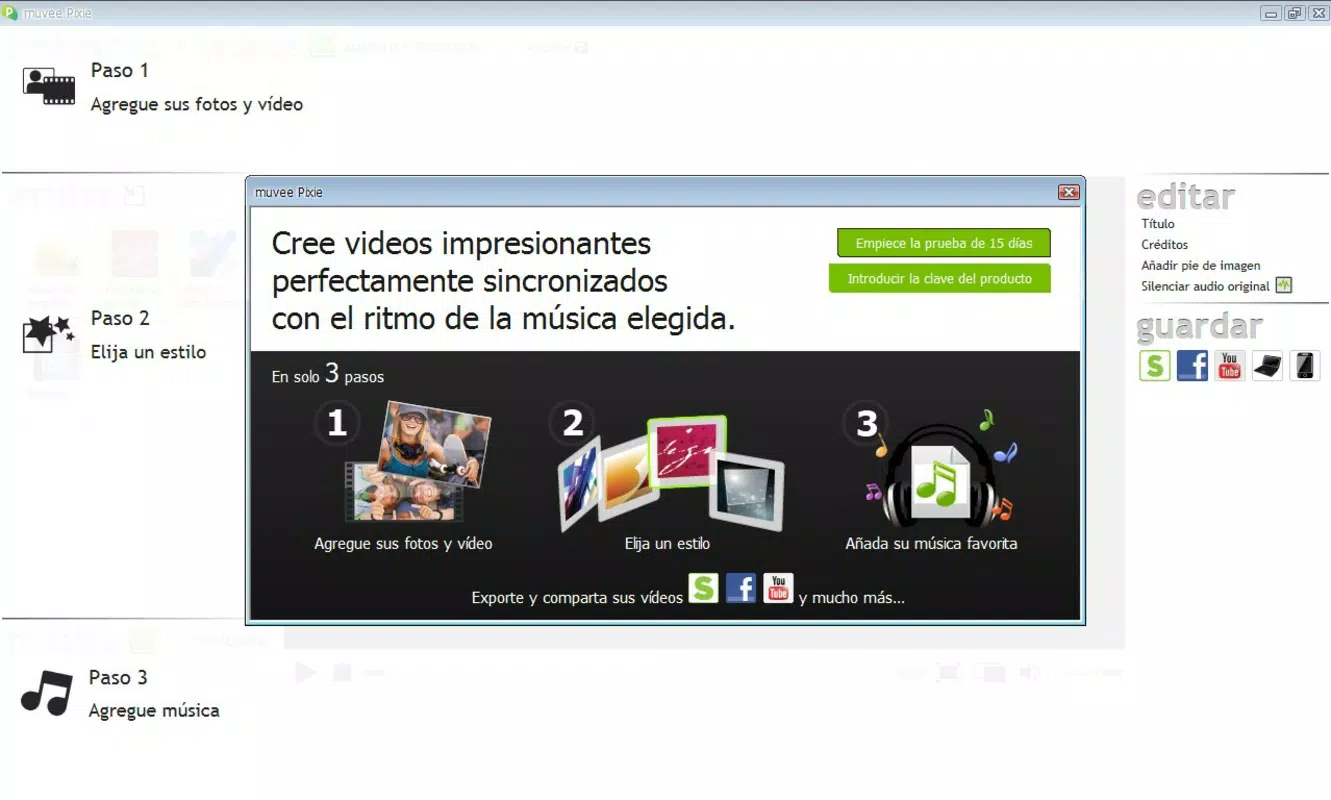
- Easy Media Upload: Users can quickly import photos and videos from their device’s library, along with their preferred music tracks. This seamless integration allows for a personalized video without the need for external file management or complex setup.
- Automatic Synchronization: The app intelligently aligns visual transitions and highlights with the rhythm and tempo of the selected soundtrack. This ensures that cuts, zooms, and effects occur at musically significant moments, resulting in a polished, professional feel.
- Variety of Styles: A range of pre-designed video templates or styles are available, each tailored to different moods and occasions—such as celebratory, romantic, or nostalgic. These styles apply consistent visual themes, color grading, and motion effects to maintain cohesion throughout the video.
- Multiple Sharing Options: After creation, videos can be shared directly to social platforms like Facebook and YouTube. The app also supports exporting in multiple formats compatible with iPod, iPhone, Android devices, and desktop systems, enabling broad accessibility across devices.
- User-Friendly Interface: The app’s layout prioritizes simplicity and clarity, guiding users through each step with minimal friction. Clear icons, intuitive navigation, and real-time previews help users experiment confidently, even if they are new to video editing.
For example, a user could upload a series of beach vacation photos, select a tropical track, and within minutes generate a vibrant, rhythmically synced video that captures the essence of the trip. This level of automation makes the app ideal for spontaneous storytelling and digital memory preservation.
Interface, UX & Performance
The user interface of Muvee Pixie is designed with simplicity and accessibility in mind. The layout follows a linear workflow: import media, choose music, select a style, preview, and share. This structured approach minimizes confusion and helps users progress smoothly from concept to completion. Visual elements are clean and uncluttered, with a focus on large, touch-friendly buttons and clear visual cues.
Navigational flow is straightforward, with consistent placement of key functions across screens. Users can easily switch between media selection, music library, style preview, and export settings. The app provides real-time previews of how the video will look with applied effects, allowing for immediate feedback and adjustments. Although the developer did not list formal performance metrics, the interface appears responsive across various device categories, suggesting optimized rendering and efficient memory usage.
Stability appears to be a strength, given the app’s long-standing availability and consistent functionality. While specific performance data was not disclosed, the app’s ability to handle multiple media files and sync them with audio without noticeable lag indicates solid backend processing. The overall experience is smooth and distraction-free, reinforcing its reputation as a reliable tool for casual video creation.
Platform Compatibility & Technical Requirements
Muvee Pixie is available on both Android and iOS platforms, making it accessible to a wide range of smartphone users. The app supports the latest versions of these operating systems, ensuring compatibility with current devices. The file size is listed as 54.8 MB, which is relatively modest for a multimedia application, allowing for quick downloads and minimal storage impact.
The developer did not specify minimum OS requirements or device-specific limitations. However, the app’s lightweight footprint and straightforward interface suggest it can run efficiently on mid-range and older devices. No additional permissions or hardware requirements were mentioned, indicating a standard integration with device cameras, storage, and audio systems. Users can expect a stable experience across different screen sizes and resolutions, though detailed compatibility information was not fully disclosed.
Pros and Cons
Pros
- Intuitive interface suitable for users of all skill levels
- Automated music synchronization enhances video quality
- Multiple video styles for diverse creative expression
- Seamless sharing to major social platforms
- Supports export in multiple formats for cross-device compatibility
Cons
- Developer did not provide detailed technical specifications
- Specific device or OS compatibility details were not listed
- Limited customization options compared to professional editing tools
- No information on update frequency or long-term support
- Some users may prefer more control over transitions and effects
FAQ
Is Muvee Pixie free to download and use?
The app’s pricing information was not fully disclosed. Users should check the app store listing for current pricing and availability of in-app purchases.
Can I use my own music in Muvee Pixie?
Yes, users can import their favorite music tracks from their device’s library to sync with their photos and videos.
Is Muvee Pixie available on both Android and iOS?
Yes, the app is available on both Android and iOS platforms.
How large is the Muvee Pixie app?
The app has a file size of 54.8 MB, which is relatively small for a multimedia application.
Can I export my videos to my computer?
Yes, Muvee Pixie allows users to export videos in formats compatible with desktop systems, including iPod, iPhone, and Android devices.
Final Thoughts
Muvee Pixie stands out as a reliable and accessible tool for creating engaging home videos with minimal effort. Its automation of music sync and style application removes the learning curve associated with traditional video editing, making it ideal for families, travelers, and casual creators who want to preserve memories in a dynamic format. The app’s emphasis on simplicity, combined with strong sharing capabilities, ensures that users can create and distribute content quickly and securely.
While it may not offer the depth of control found in professional software, its strengths lie in speed, usability, and fun. For anyone seeking a straightforward way to turn photos into captivating videos, Muvee Pixie delivers real value. The ability to share directly to social media and export across devices enhances its utility in today’s connected world.
Download Muvee Pixie now


